For landlords with 1 to 10 properties

Your rentals, in one tidy spreadsheet.

Log rent and expenses as they come in. The workbook shows which tenants are behind, how much each property earns, and every expense totaled by Schedule E line for tax time.

One-time purchase · Excel and Google Sheets · Instant download
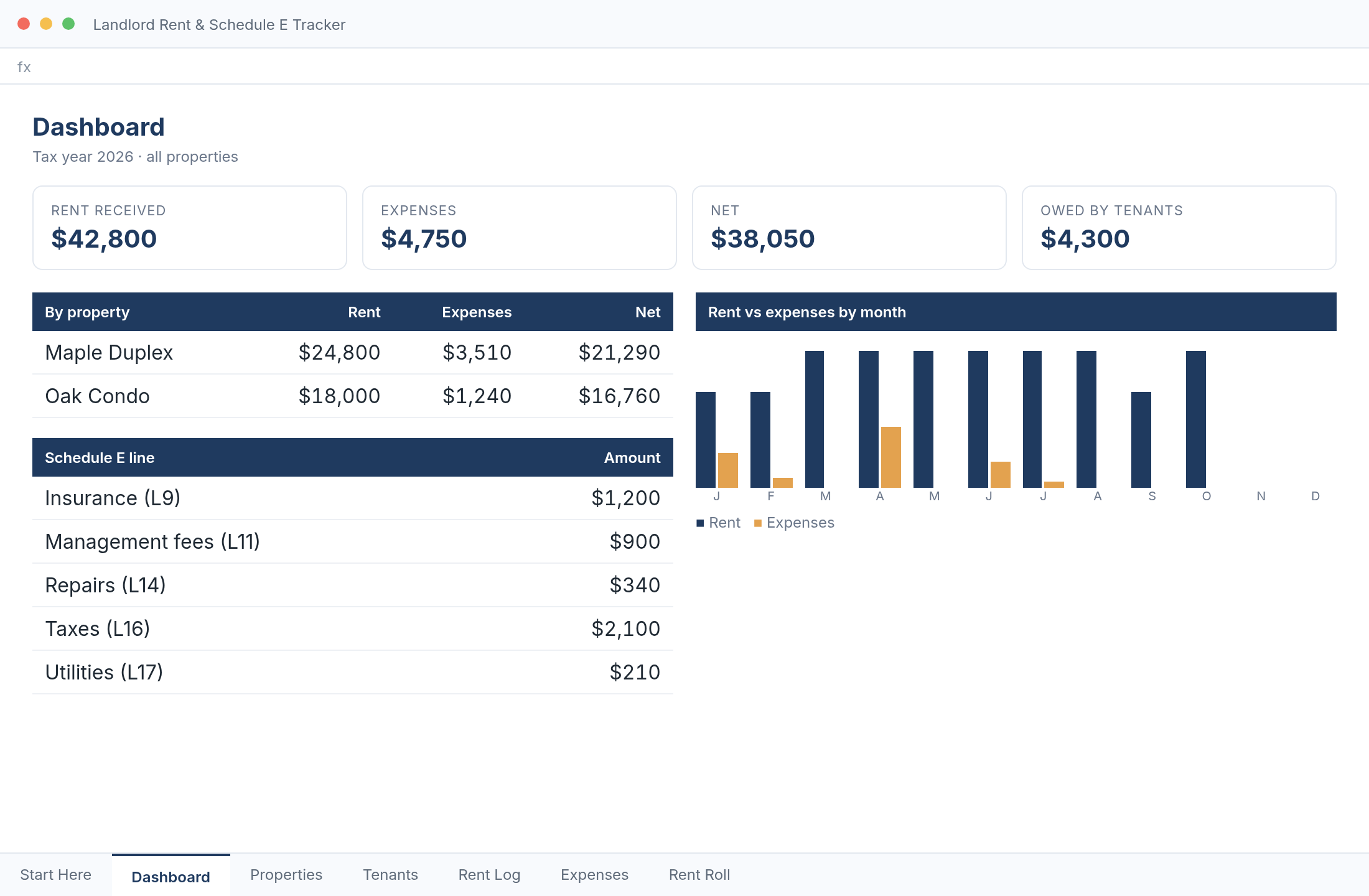
Dashboard tab showing rent received, expenses, net and a monthly chart
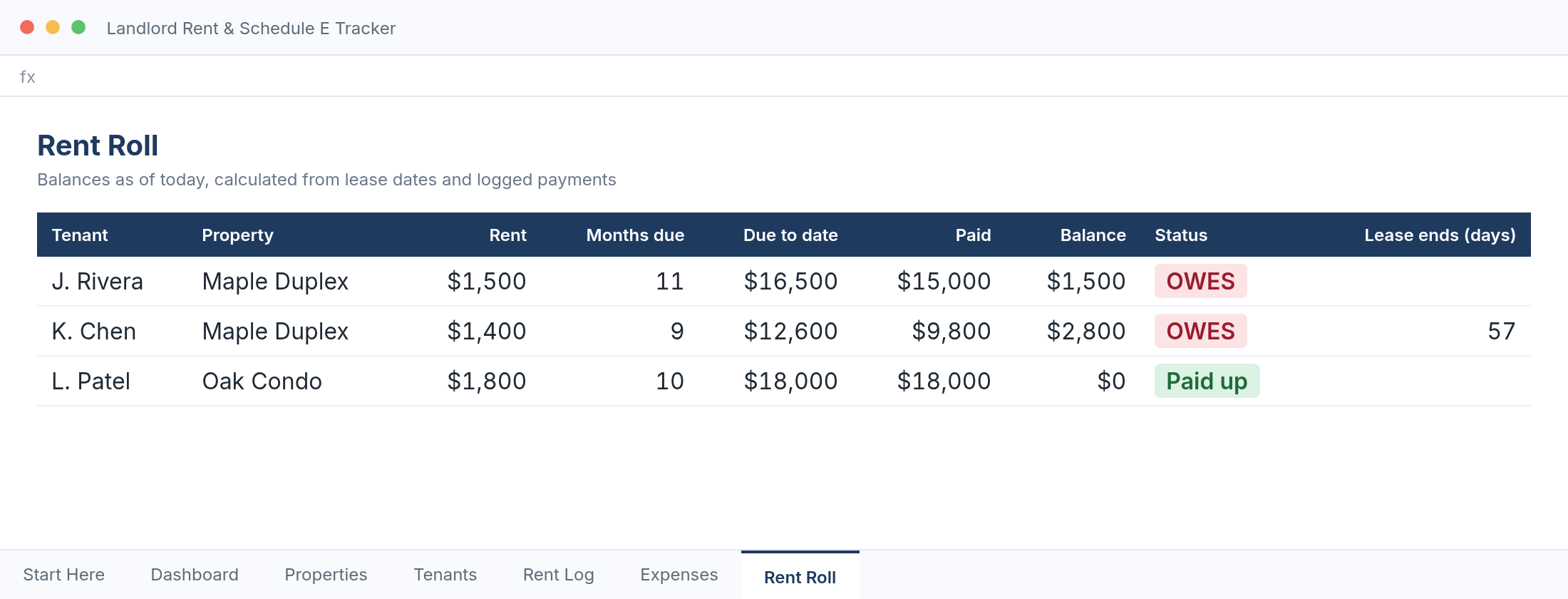
Rent Roll tab showing each tenant's balance and status
Works inExcel & Google Sheets
Tabs7, with setup guide
Capacity10 properties, 40 tenants
Price$19, no subscription
What it does

Three questions, answered whenever you open it

Who owes me rent?

The rent roll works out how much each tenant should have paid since their lease began, subtracts what you've logged, and shows the balance.

  • OWES, Paid up or Credit status for every tenant
  • Uses each lease's rent amount and due day
  • Leases ending within 60 days are highlighted
Rent Roll tab

What can I deduct?

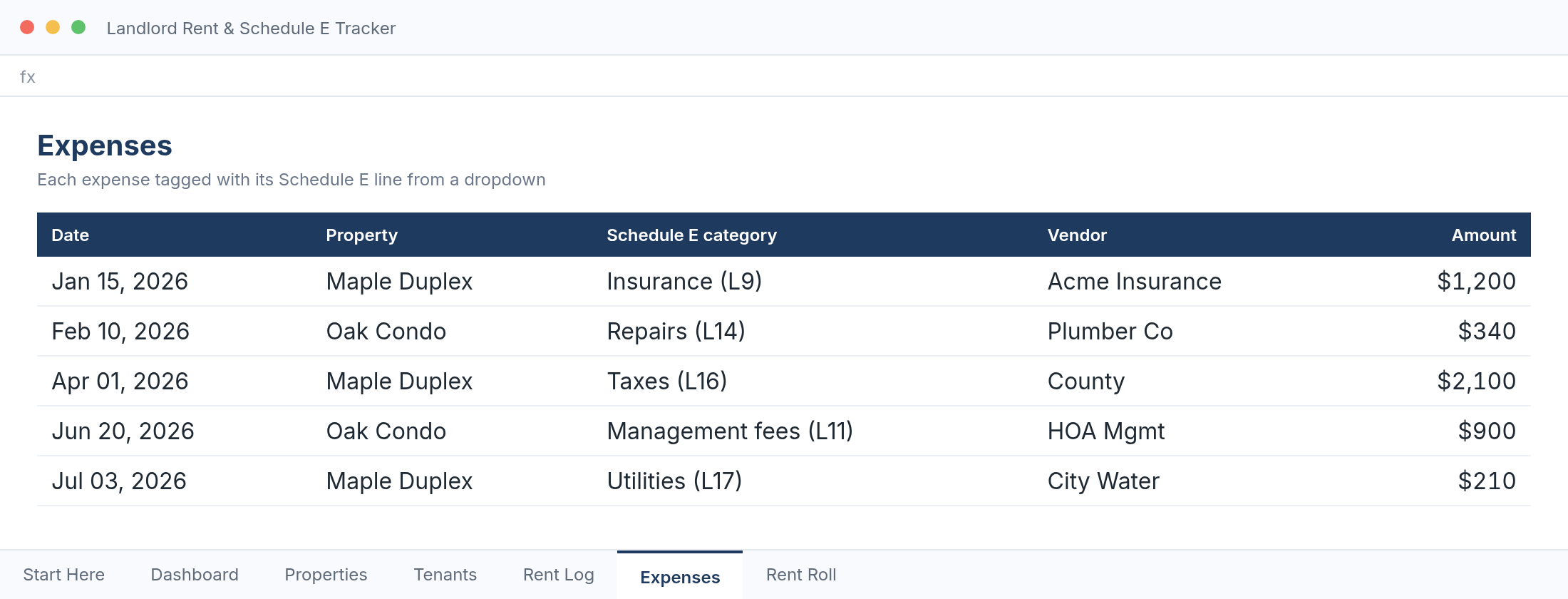
Choose one of the 15 Schedule E expense lines from a dropdown as you log each expense. At year end the totals for each line are already added up.

  • Lines 5–19, from advertising to depreciation
  • Pick any tax year on the dashboard
  • A clean summary to hand your tax preparer
Expenses tab with Schedule E categories

Which property earns the most?

The dashboard shows rent received, expenses and net for each property, plus a month-by-month chart, all calculated from the entries you've made.

  • Year totals and amount owed by tenants at the top
  • Net per property
  • Monthly rent compared with expenses
Dashboard tab
What's included

Everything in the download

Two .xlsx files: a blank tracker ready for your data, and a filled-in example so you can see how each tab works.

Start Here

A step-by-step setup guide inside the file.

Properties & Tenants

Your properties, plus each lease's rent, due day, dates and deposit.

Rent Log

Up to 1,500 payments. Each one is matched to its property automatically.

Expenses

Up to 1,500 expenses, each tagged with a Schedule E line and a property.

Rent Roll

Balance, status and lease end for each tenant.

Dashboard

Year totals, per-property net, Schedule E totals and a monthly chart.

Pricing

Start free. Upgrade when you outgrow it.

Lite

$0

For one or two units

  • 2 properties, 4 tenants
  • 60 payments and 60 expenses
  • Rent roll and Schedule E totals
  • Monthly chart
  • Filled-in example file
Download free

Full tracker

$19 one-time

For a growing portfolio

  • 10 properties, 40 tenants
  • 1,500 payments and 1,500 expenses
  • Rent roll and Schedule E totals
  • Monthly chart
  • Filled-in example file
Buy the full tracker
How it works

Ready in minutes

01

Buy and download

Pay $19 in USDC (card or Apple Pay via a wallet app works). Email your order id and the full workbook arrives within one business day.

02

Open it

Open the file in Excel, or upload it to Google Drive and open it with Google Sheets.

03

Add your rentals

Enter your properties and leases once, then log payments and expenses as they happen.

Free tools

Try three helpers before you buy

Each one runs in your browser. No signup.

FAQ

Questions

Do I need Excel?

No. Google Sheets is free: upload the file to Google Drive and open it with Google Sheets. Excel 2010 or later works too.

Is there a subscription?

No. You pay $19 once and the file is yours.

Is this tax software?

No. It's a record-keeping workbook. The categories match Schedule E (Form 1040) to make your preparer's job easier, but it doesn't file anything or give tax advice.

Which currency does it use?

Amounts are shown in dollars. You can change the number format to any currency in Excel or Sheets.

Can I try it first?

Yes. The free lite version has the same rent roll and Schedule E totals, limited to 2 properties.

Know where every dollar of rent stands.

Get the tracker — $19Try it free